Documents
Documents in xTool represent electronic invoices and other business documents that flow through your organisation. Each document has a lifecycle with different statuses and operations available throughout its journey.
What is a Document?
A document in xTool is an electronic business document, typically an invoice, that contains structured indexed metadata and related business transactions. Documents can be of two types:
- Inbound: Documents received from other organisations
- Outbound: Documents sent to other organisations
Documents are associated with your organisation and contain metadata such as invoice numbers, dates, buyer and seller information, and transaction details.
Document Statuses and Lifecycle
Documents progress through various statuses during their lifecycle. The following statuses are visible to clients:
Upload Statuses:
- Uploaded - Document successfully uploaded to the system
- Uploading Error - Failed to upload the document
Receiving Statuses (Inbound Documents):
- Receiving Peppol Success - Successfully received via Peppol network
- Receiving Peppol Error - Failed to receive via Peppol
Sending Statuses (Outbound Documents):
Email Transmission:
- Sending Email - Document being sent via email
- Sending Email Success - Successfully sent via email
- Sending Email Error - Failed to send via email
Peppol Network Transmission:
- Sending Peppol - Document being sent via Peppol network
- Sending Peppol Success - Successfully sent via Peppol
- Sending Peppol Error - Failed to send via Peppol
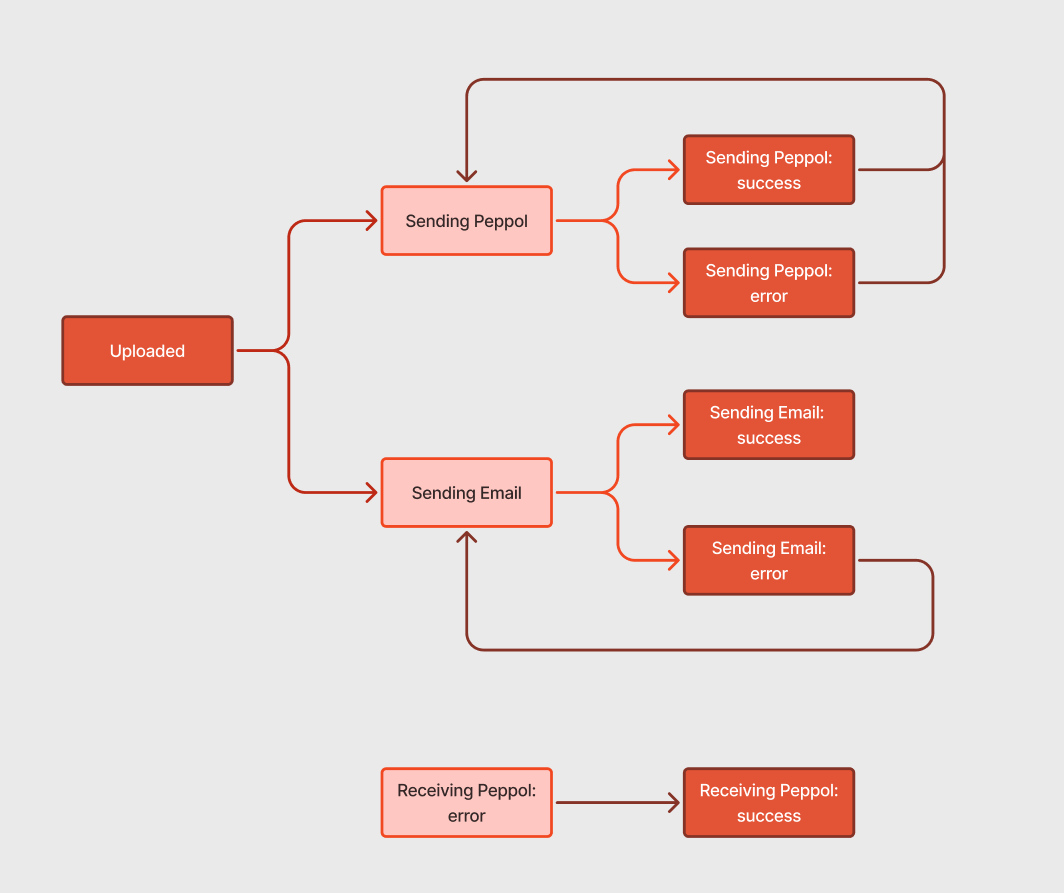
This lifecycle ensures complete tracking of document processing from creation to final delivery, with comprehensive error handling and status monitoring throughout the journey. The system maintains a complete document status log that records all status changes with timestamps, allowing you to view the complete history of document processing and track the progression through each status change.
Document Operations
The xTool system provides comprehensive document management capabilities including browsing, searching, viewing metadata, downloading XML/PDF files, and removing documents. You can upload new documents, modify content, validate structure and compliance, and transmit documents via Peppol network or email. The system offers complete monitoring with status tracking, history viewing, and error handling for full visibility and control over document processing operations.
Document Entry and Validation
Documents can be added to the xTool system through various channels including the web application interface, API integration, or direct import from the Sevdesk accounting system. However, documents can only be successfully added to the application when they are valid and properly recognized by the system. For XML files, this means the document format must be supported by the application and must pass both XSD (XML Schema Definition) and XSLT validation processes. This validation ensures that only compliant and properly structured documents enter the system, maintaining data integrity and processing reliability throughout the document lifecycle.